


Your business has found that a majority of your audience is active on Facebook, so now what?
You must have a presence on Facebook and engage with that audience!
Here's how to create a business Facebook page:
First, you must have a personal Facebook account, or create one. All Facebook business pages are managed by at least one personal Facebook account.
Next, visit Facebook's Create A Page section for a wizard that will help you figure out how to create a Facebook business page. The first question you'll answer is which type of page you'd like to create (business, brand, public figure, etc.). In doing so, you'll fill out your business category, name, location and phone number to help you in building your profile.
From here, fill out your "About" section. These sections will help your organic search results:
- Short Description: This 157 character text box should include a short bio of your business. Try including your website URL, since this is all that's seen on your page until "About" is clicked.
- Mission: Share what purpose you serve as a company. Be transparent and open with your Facebook audience about what you strive to achieve.
- Company Overview: Give a high-level view of your goals, products or services that you provide.
- Long Description: Extend upon what you wrote in your short description to give visitors a more in-depth look at your company.
If you're feeling ambitious you can even fill out the year you were Founded, Awards you have won, and Products you provide. Some businesses even share Life Events that allow their fans to go on a journey with them through their success.
The next step in building your profile is using images to give life to your Facebook business page! First, select a profile picture that best represents your business. Businesses usually choose their logo, since it is shown on your page and as the icon displayed next to each item posted from your business page. You should also choose a cover photo. This photo is the large header image displayed above your profile. This image should be relatable to your business, collaborative with your profile picture, and eye-catching. An easy way to find such an image is to design your own with Pagemodo's Cover Photo Designer tool. Just be sure to follow the image specs Facebook gives you for the best results.
Again, for the ambitious business owner, you can start building out Custom Tabs for your business page. These tabs may include links to other social platforms or helpful pages on your website visitors can access right from your Facebook page! It is another way to keep your fans entertained and engaged.
At last, it is time to promote! Invite customers, community members, friends and family to "Like" your page. And remember to post fun, timely, and informative content to keep them coming back.
And that's how to create a Facebook business page.
The necessary details:
When you're first learning about how to make a Facebook Business Page, all of the terminology can get confusing. Below, you'll find a diagram should help clear up the parts of a Facebook Page, as well as tips for making the most of each section. Follow these tips, and you'll be well on your way to having to having an engaging, effective business page on Facebook.
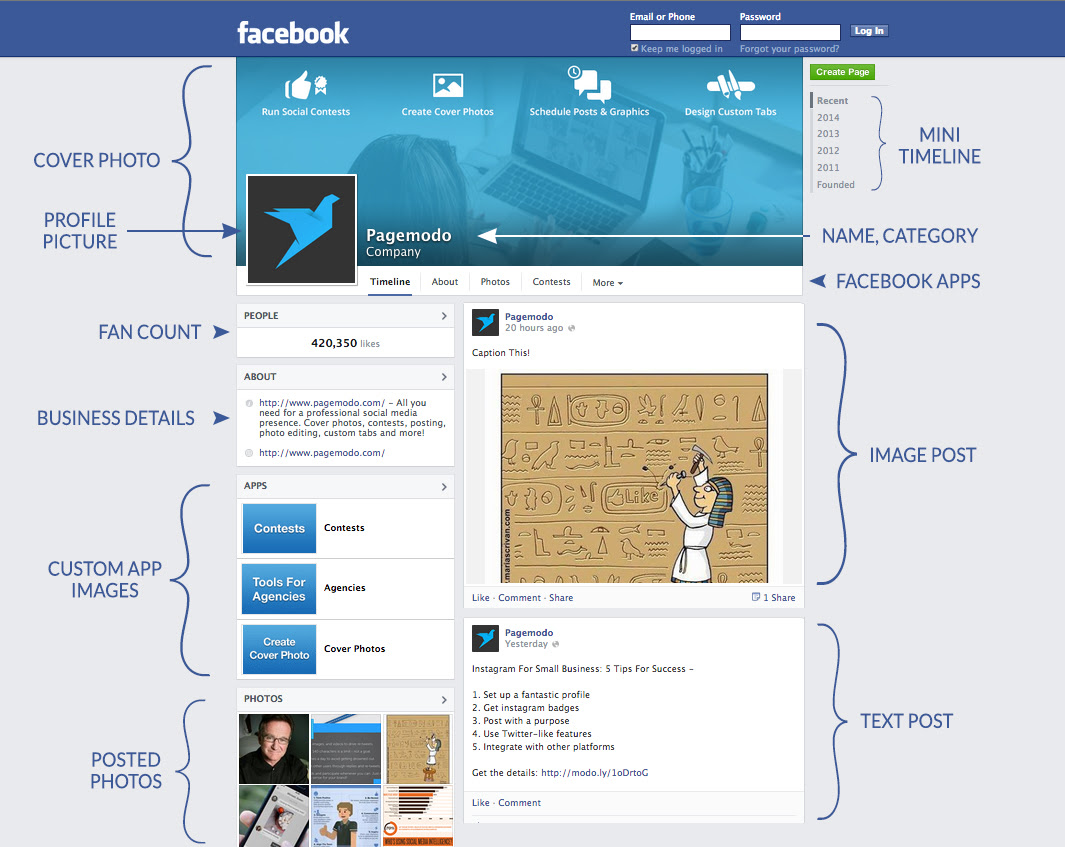
1. Cover Photo
The cover photo is your Facebook page's billboard. Use this space creatively to tell the world something about your brand and the way people interact with it. You can include a small amount of copy here, but try not to over-use text on your cover photo. It should be simple, graphic, and eye-catching. With Facebook's recent timeline update, the cover photo now shows up on every section of your page, so make sure to show it some love.
2. Profile Picture
If your Facebook Page is for a business (as opposed to a public figure), this space should be used for your logo. The profile picture appears over the cover photo in full size, and also alongside all of your posts at a much smaller size. Make sure whatever you use here still translates when it's shrunken down.
3. Fan Count
Not much customization you can do here, but there is a lot you can do to drive that number up! Consider a Facebook Contest as a great way to get people to share your content and like your page.
4. Business Details
Also known as your "About' section, this is where you should put the most important things about your business that you want potential fans to know at a glance. You can put more details in your full profile text, but reserve this space for the highlights. It's also good to include your web address here!
5. Custom App Images
When Facebook recently updated its timeline, the individual images for your Facebook Apps were moved from just below the cover photo down to this box. If you are using apps that you can customize the images for, make sure you do it! This is a great piece of real estate and shouldn't be wasted.
6. Posted Photos
Great imagery is key to an engaging Facebook presence. You should regularly post photos of your products, your place of business, your staff, and graphic designs that you create for events and promotions at your business. Everything you post will be kept in this section in chronological order.
7. Mini Timeline
When something important happens in the life of your business, make sure you add a timeline event for it. It helps people engage in the history of your brand, and it gets automatically organized by year in your timeline and mini timeline.
8. Name and Category
This seems like it should be easy, but there are a few pitfalls to avoid. First, when naming your company, be aware that Facebook users frequently search Facebook for the brands they want to interact with. They rarely go to the company's website, find their Facebook link, and follow through. So be sure your Facebook Page name is as simple and accurate as possible. Picking your category as accurately as possible is also key to searches.
9. Image Posts
As mentioned before, imagery is the most engaging form of content on Facebook. It stands out in the Facebook Timeline and is far more likely to get shared than text-only content.
10. Text Only Posts
While the advice above about image posts is generally true for the majority of Facebook Pages, the EdgeRank algorithm that Facebook uses to determine post organic reach can cause some tricky things to happen sometimes. Some page owners may find that text-only posts have more reach, but fewer comments, for example - or the other way around. Keep an eye on your analytics and see what works for you.
By now, you should feel confident that you know how to make a business page on Facebook. So start creating now!