


Instructions to Give Your Clients for Writing a Review
Once your Google My Business account is set up and verified, you'll be able to receive reviews. The most direct way for your clients to get to your page and write you a review is to use Google Local. These are the steps for writing a review on Google:
- Go to https://plus.google.com/local/
- Sign in with your Google account
- Search for the business name you wish to review
- Click the pencil icon above the profile picture
- Select 5 stars out of 5
- Write a description of their experience
- Click Publish
When you send your client instructions on writing a review for you specifically, however, you should complete steps one and three for them. After you search, you'll be able to copy the web address that leads directly to your search results and send that to them instead.
The web address will look something like this: https://plus.google.com/local/Austin%2C%20TX/s/ myrna%20garcia.
An easy way to make long, unattractive web addresses like the one above is to use a service like bit.ly or goo.gl to create what's called a short link. Short links will make your email request for a review look much more professional and most importantly much easier.
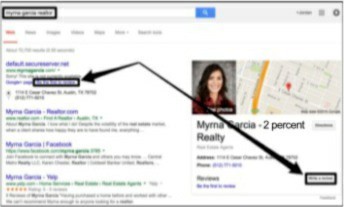
Alternatively, you can simply search for your business name in Google. If the process was completed correctly, you should see a preview of your Google My Business page in the right hand side of the search results page. The links to use to write a review are pointed out in this screenshot.
You can use the email template below for asking for reviews:
Hi [Name Here]
Congratulations on the sale/purchase of your home!
You really made the difference in helping me achieve my goals of giving you a 5-star experience.
Without your help in letting me know what you wanted during the entire process, it would not have been possible.
But there's one more step necessary to confirm the 5-star experience I strive to provide you with... your review of us working together!
By authoring this review, you're doing me a HUGE favor, and I want you to know how much I appreciate you for it. You can rate your 5-star experience and write your quick review here (it should only take a few moments).
[Name here} Thanks again! [Signature}
PS. If there's anything I can do to help you get situated, please let me know
PPS. If you feel as though I fell short of a 5-star experience, please tell me now by simply replying to this email.
We wrote this template to be applicable for any reviewing platform, but please feel free to include additional instructions after the short link. It would be a good idea, for example, to point out the pencil icon or to remind your clients of a particular memorable moment of your time together for them to include in their review. You can also include links to multiple review platforms to encourage your clients to spread the good word!
What to Do If You Don't Have Any Reviews Yet
There's two reasons you might not yet have any online reviews:
- You've been practicing real estate for a while, but have just not solicited any reviews from your past or current clients yet.
- You're a new agent with little to no experience.
If you are a part of the first group, then the solution your online review deficit is easy. You've sold real estate before, which means that you have past clients. Simply reach out to those people and ask them to review you honestly. Consider this an opportunity to connect with your network!
A subset of this group is those of you who have reviews on other platforms but not Google. In this case, reach out specifically to those past clients who have given you 5-star reviews elsewhere, and say this: I'm currently working on building my online presence on Google. Would you be so kind as to duplicate your past review on Google?
New agents will need a different plan of attack. Initially, your biggest resource for online credibility is your family, friends, and colleagues. While they cannot speak to your work from a client's perspective, they can attest to your work ethic, personality, trustworthiness, and other such qualities. In their review, have them talk about such things as how they know you and for how long. If they can recount any anecdotes that demonstrate your character, have them include those as well.
How to Respond to Negative Online Reviews
Online reviews, according to a recent study, are trusted just as much as or even more than a personal recommendation. This means that each and every review has a lot of weight in how your business appears to prospective clients. To prevent your online presence from becoming the product of a one-sided conversation, you must make it a priority to respond to the reviews you receive — especially the negative ones.
On Google My Business, the steps to respond to a review from your computer are as follows, but please note that you will need to have already verified your business in order to see these options:
- Log into your Google My Business account
- Select the Reviews tab and find the option Manage Reviews
- Under Reviews from Google Users, click View and Reply on the review you wish to address
- Write a response and hit Submit
You can also respond to online reviews from your mobile app. In the app, select the three bar menu in the top corner, then hit Reviews. Touch Respond Now to reply to the reviewer. With each method, your reply will show as authored by your business and will be public.
Positive reviews should receive at least a Thank you, and optimally will include some personal touch that shows your client that you remember and value them. But what do you say when you receive a negative review? The first thing to remember is that bad reviews are inevitable. Mistakes happen, and people who are upset will naturally be more aggressive and vocal about their displeasure.
The second thing to remember is for whose benefit you are responding to the negative review. Certainly, a hopeful outcome would be that you mitigate the damaged relationship between you and the negative reviewer, and a proven process for that is discussed in more detail below. But you're really aiming to please your future clients. Think about it: everyone knows that upset people are prone to overreacting. If your potential clients look up your reviews online and see that you've apologized and attempted to resolve the issue had by a negative reviewer, they be more likely to disregard the opinion of that reviewer.
Therefore, as you reply to a negative review, follow the steps below:
- Respond publicly so that future clients and reviewers can see your responsiveness and attitude to serve all customers. Check out the template below for a starting point.
- Thank the reviewer for taking the time to review your service
- Theoretically, the reviewer will be a past client, so you will most likely have their phone number. Use whatever contact information you have on that person to reach out to him or her privately to get more feedback and to potentially resolve conflict.
- Ask the reviewer to consider updating their review to show follow-up steps taken
- Follow up publicly on the review to let future readers know the outcome
Hi[Name Here]
Thank you so much for providing your review.
Your review is especially important to me because whenever someone has a bad experience (or a less than 5-star one), I like to learn as much as possible to prevent it from happening again.
If you're open to it, I'd like to have a quick chat to see if there's anything I can do to right the situation for you.
Thanks!
Your Name
Phone and Email